Explain Different types of Authentication modes available in SQL Server
What is SQL Server. Explain the SQL Server Architecture in Detail

What is difference between SINGLE_USER, RESTRICTED_USER and MULTI_USER?

These are the ALTER DATABASE SET commands which we can use to get exclusive access to SQL Server Database.

SINGLE_USER Database Access Mode

In SINGLE_USER access mode at any given point of time only one user can access the database. The user can be any user who has access to the database.

Note: Before setting the database to Single user mode make sure to STOP the sql server agent or see if any AUTO_UPDATE_STATISTICS_ASYNC option is set to OFF. Otherwise the Sql Server Agent or the background thread which updates the stats may utilize the only allowed connection.

RESTRICTED_USER Access Mode

In RESTRICTED_USER access mode only the users who have db_owner or db_creator permission can access. Users who belong to the sysadmin fixed server role can also access the database which is in RESTRICTED_USER access mode.

At any given point of time ZERO or Many user can access the database as long as they have specified permission as mentioned previously.

MULTI_USER Access Mode

This is the default database user access mode. In this database user access mode any user who have permission to access the database can access the database.

1
2
3
ALTER DATABASE Database_Name
SET MULTI_USER
GO

NOTE: “WITH ROLLBACK IMMEDIATE” ALTER Database option causes all the incomplete transactions to be rolled back and any other connections to the database to be immediately disconnected.

How to check database current user access mode?

Below examples show how we can check the current database user access mode:

Example 1: We can use the DATABASEPROPERTYEX() function to check the database user access mode.

SELECT DATABASEPROPERTYEX('SqlHintsDBAccessDEMO','UserAccess')
                      AS 'Current Database Access Mode'

Example 2: We can also use the sys.databases catalog view to check the database user access mode.

SELECT user_access_desc
FROM SYS.databases WHERE name = 'SqlHintsDBAccessDEMO'

Ref: 

Explain Different types of Authentication modes available in SQL Server

In simple words, Authentication means a process of identifying a user or a person based on their username and password. In the same way, SQL Server also authenticates their users by their credentials.

SQL Server uses the following 2 types of authentication.

  • Windows Authentication.
  • Mixed Mode Authentication (Windows + SQL Server Authentication)
Windows authentication is the default, and is often referred to as integrated security because this SQL Server security model is tightly integrated with Windows. Specific Windows user and group accounts are trusted to log in to SQL Server. Windows users who have already been authenticated do not have to present additional credentials.

Mixed mode supports authentication both by Windows and by SQL Server. User name and password pairs are maintained within SQL Server.

Windows Authentication

In Windows Authentication mode, when you're using SQL Server from the same computer as where it's installed, SQL Server doesn't ask for username and password as shown below.


As you can see, in Windows Authentication mode, the username and password fields are disabled. SQL Server uses your computer's username as the SQL Server username. And when you click on the connect button, it'll provide you the access.

Because SQL knows that the user is already logged into the operating system with the correct credentials and it allows user to access databases.

SQL Server Authentication

When you use SQL Server Authentication, you must require a username and password. In the business world, most applications use this authentication to provide their client or vendor access to their databases.

An instance of SQL Server can have multiple user accounts with various usernames and passwords. In a shared environment, since different users have different access on different databases, SQL Server Authentication should be used.

The following is an example of that.


When a user connects with a specified login name and password from a non-trusted connection, SQL Server does the authentication itself by checking to see if a SQL Server login account has been set up and if the specified password matches the one previously recorded.

If SQL Server does not have a login account set, the authentication fails and the user receives an error message as shown below.


SQL Server Authentication is provided for backward compatibility because applications written for SQL Server version 7.0 or earlier may require the use of SQL Server logins and passwords.

Additionally, SQL Server Authentication is required when an instance of SQL Server is running on Windows 98 because Windows Authentication Mode is not supported on Windows 98.

The following is the flowchart for the process of authentication.


As you can see, when the user tries to connect to SQL Server, SQL Server asks the user for the mode of authentication. If the user selects “Windows Authentication” then SQL Server checks whether the user is authorized to connect. If yes then it'll open the gate for the user to access the data else it throws an error.

If the user chooses the second option, in other words “SQL Server Authentication”, then SQL Server asks for username and password.

Next when the user enters his/her credentials, SQL Server checks the entered credentials with the credentials stored in the master database. If both credentials matche then it allows the user to connect to SQL Server else it'll give an error.

So, these are the ways by which we can connect to SQL Server.

What is SQL Server. Explain the SQL Server Architecture in Detail

What is SQL Server

SQL SERVER is a relational database management system (RDBMS) developed by Microsoft. It is primarily designed and developed to compete with MySQL and Oracle database.

SQL Server supports ANSI SQL, which is the standard SQL (Structured Query Language) language. However, SQL Server comes with its own implementation of the SQL language, T-SQL (Transact-SQL).

T-SQL is a Microsoft propriety Language known as Transact-SQL. It provides further capabilities of declaring variable, exception handling, stored procedure, etc.


SQL Server Management Studio (SSMS) is the main interface tool for SQL Server, and it supports both 32-bit and 64-bit environments.

SQL Server works exclusively on Windows environment for more than 20 years. In 2016, Microsoft made it available on Linux. SQL Server 2017 became generally available in October 2016 that ran on both Windows and Linux.

SQL Server Architecture Explained: Named Pipes, Optimizer, Buffer Manager

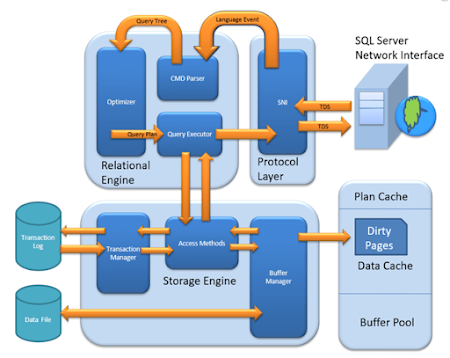
MS SQL Server is a client-server architecture. MS SQL Server process starts with the client application sending a request. The SQL Server accepts, processes and replies to the request with processed data. Let's discuss in detail the entire architecture shown below:

As the below Diagram depicts there are three major components in SQL Server Architecture:

  1. Protocol Layer
  2. Relational Engine
  3. Storage Engine

Protocol Layer - SNI

MS SQL SERVER PROTOCOL LAYER supports 3 Type of Client Server Architecture. We will start with "Three Type of Client Server Architecture" which MS SQL Server supports.

Shared Memory

Let's reconsider an early morning Conversation scenario.

MOM and TOM - Here Tom and his Mom, were at the same logical place, i.e. at their home. Tom was able to ask for Coffee and Mom was able it serve it hot.

MS SQL SERVER - Here MS SQL server provides SHARED MEMORY PROTOCOL. Here CLIENT and MS SQL server run on the same machine. Both can communicate via Shared Memory protocol.

Analogy: Lets map entities in the above two scenarios. We can easily map Tom to Client, Mom to SQL server, Home to Machine, and Verbal Communication to Shared Memory Protocol.

From the desk of configuration and installation:

For Connection to Local DB – In SQL Management Studio, "Server Name" Option could be

"."

"localhost"

"127.0.0.1"

"Machine\Instance"


TCP/IP

Now consider in the evening, Tom is in the party mood. He wants a Coffee ordered from a well-known Coffee Shop. The Coffee shop is located 10 km away from his home.

Here Tom and Starbuck are in different physical location. Tom at home and Starbucks at the busy marketplace. They're communicating via Cellular network.

Similarly, MS SQL SERVER provides the capability to interact via TCP/IP protocol, where CLIENT and MS SQL Server are remote to each other and installed on a separate machine.

Analogy: Lets map entities in the above two scenarios. We can easily map Tom to Client, Starbuck to SQL server, the Home/Market place to Remote location and finally Cellular network to TCP/IP protocol.

Notes from the desk of Configuration/installation:

  • In SQL Management Studio - For Connection via TCP\IP, "Server Name" Option has to be "Machine\Instance of the server."
  • SQL server uses port 1433 in TCP/IP.


Named Pipes

Now finally at night, Tom wanted to have a light green tea which her neighbor, Sierra prepare very well.

Here Tom and his Neighbor, Sierra, are in same physical location, being each other's neighbor. They're communicating via Intra network. 

Similarly, MS SQL SERVER provides the capability to interact via the Named Pipe protocol. Here the CLIENT and MS SQL SERVER are in connection via LAN.

Analogy: Lets map entities in the above two scenarios. We can easily map Tom to Client, Sierra to SQL server, Neighbor to LAN and finally Intra network to Named Pipe Protocol.

Notes from the desk of Configuration/installation:

  • For Connection via Named Pipe. This option is disabled by default and needs to be enabled by the SQL Configuration Manager.

What is TDS?

Now that we know that there are three types of Client-Server Architecture, lets us have a glance at TDS:

  • TDS stands for Tabular Data Stream.
  • All 3 protocols use TDS packets. TDS is encapsulated in Network packets. This enables data transfer from the client machine to the server machine.
  • TDS was first developed by Sybase and is now Owned by Microsoft

Relational Engine

The Relational Engine is also known as the Query Processor. It has the SQL Server components that determine what exactly a query needs to do and how it can be done best. It is responsible for the execution of user queries by requesting data from the storage engine and processing the results that are returned.

As depicted in the Architectural Diagram there are 3 major components of the Relational Engine. Let's study the components in detail:

CMD Parser

Data once received from Protocol Layer is then passed to Relational Engine. "CMD Parser" is the first component of Relational Engine to receive the Query data. The principal job of CMD Parser is to check the query for Syntactic and Semantic error. Finally, it generates a Query Tree. Let's discuss in detail.

Syntactic check:

  • Like every other Programming language, MS SQL also has the predefined set of Keywords. Also, SQL Server has its own grammar which SQL server understands.
  • SELECT, INSERT, UPDATE, and many others belong to MS SQL predefined Keyword lists.
  • CMD Parser does syntactic check. If users' input does not follow these language syntax or grammar rules, it returns an error.

Semantic check:

  • This is performed by Normalizer.
  • In its simplest form, it checks whether Column name, Table name being queried exist in Schema. And if it exists, bind it to Query. This is also known as Binding.
  • Complexity increases when user queries contain VIEW. Normalizer performs the replacement with the internally stored view definition and much more.

Create Query Tree:

  • This step generates different execution tree in which query can be run.
  • Note that, all the different trees have the same desired output.

Optimizer

The work of the optimizer is to create an execution plan for the user's query. This is the plan that will determine how the user query will be executed.

Note that not all queries are optimized. Optimization is done for DML (Data Modification Language) commands like SELECT, INSERT, DELETE, and UPDATE. Such queries are first marked then send to the optimizer. DDL commands like CREATE and ALTER are not optimized, but they are instead compiled into an internal form. The query cost is calculated based on factors like CPU usage, Memory usage, and Input/ Output needs.

Optimizer's role is to find the cheapest, not the best, cost-effective execution plan.

MS SQL Optimizer works on inbuilt exhaustive/heuristic algorithms. The goal is to minimize query run time. All the Optimizer algorithms are propriety of Microsoft and a secret. Although, below are the high-level steps performed by MS SQL Optimizer. Searches of Optimization follows three phases as shown in the below diagram:


Phase 0: Search for Trivial Plan:

  • This is also known as Pre-optimization stage.
  • For some cases, there could be only one practical, workable plan, known as a trivial plan. There is no need for creating an optimized plan. The reason is, searching more would result in finding the same run time execution plan. That too with the extra cost of Searching for optimized Plan which was not required at all.
  • If no Trivial plan found, then 1st Phase starts.

Phase 1: Search for Transaction processing plans

  • This includes the search for Simple and Complex Plan.
  • Simple Plan Search: Past Data of column and Index involved in Query, will be used for Statistical Analysis. This usually consists but not restricted to one Index Per table.
  • Still, if the simple plan is not found, then more complex Plan is searched. It involves Multiple Index per table.

Phase 2: Parallel Processing and Optimization.

  • If none of the above strategies work, Optimizer searches for Parallel Processing possibilities. This depends on the Machine's processing capabilities and configuration.
  • If that is still not possible, then the final optimization phase starts. Now, the final optimization aim is finding all other possible options for executing the query in the best way. Final optimization phase Algorithms are Microsoft Propriety.

Query Executor

Query executer calls Access Method. It provides an execution plan for data fetching logic required for execution. Once data is received from Storage Engine, the result gets published to the Protocol layer. Finally, data is sent to the end user.

Storage Engine

The work of the Storage Engine is to store data in a storage system like Disk or SAN and retrieve the data when needed. Before we deep dive into Storage engine, let's have a look at how data is stored in Database and type of files available.

Data File and Extent:

Data File, physically stores data in the form of data pages, with each data page having a size of 8KB, forming the smallest storage unit in SQL Server. These data pages are logically grouped to form extents. No object is assigned a page in SQL Server.

The maintenance of the object is done via extents. The page has a section called the Page Header with a size of 96 bytes, carrying the metadata information about the page like the Page Type, Page Number, Size of Used Space, Size of Free Space, and Pointer to the next page and previous page, etc.

File types

  1. Primary file
  • Every database contains one Primary file.
  • This store all important data related to tables, views, Triggers, etc.
  • Extension is .mdf usually but can be of any extension.
  1. Secondary file
  • Database may or may not contains multiple Secondary files.
  • This is optional and contain user-specific data.
  • Extension is .ndf usually but can be of any extension.
  1. Log file
  • Also known as Write ahead logs.
  • Extension is .ldf
  • Used for Transaction Management.
  • This is used to recover from any unwanted instances. Perform important task of Rollback to uncommitted transactions.

Storage Engine has 3 components; let's look into them in detail.

Access Method

It acts as an interface between query executor and Buffer Manager/Transaction Logs.

Access Method itself does not do any execution.

The first action is to determine whether the query is:

  1. Select Statement (DDL)
  2. Non- Select Statement (DDL & DML)

Depending upon the result, the Access Method takes the following steps:

  1. If the query is DDL, SELECT statement, the query is pass to the Buffer Manager for further processing.
  2. And if query if DDL, NON-SELECT statement, the query is pass to Transaction Manager. This mostly includes the UPDATE statement.

Buffer Manager

Buffer manager manages core functions for modules below:

  • Plan Cache
  • Data Parsing: Buffer cache & Data storage
  • Dirty Page

Plan Cache

  • Existing Query plan: The buffer manager checks if the execution plan is there in the stored Plan Cache. If Yes, then query plan cache and its associated data cache is used.
  • First time Cache plan: Where does existing Plan cache come from?

    If the first-time query execution plan is being run and is complex, it makes sense to store it in in the Plane cache. This will ensure faster availability when the next time SQL server gets the same query. So, it's nothing else but the query itself which Plan execution is being stored if it is being run for the first time.

Data Parsing: Buffer cache & Data Storage

Buffer manager provides access to the data required. Below two approaches are possible depending upon whether data exist in the data cache or not:

Buffer Cache - Soft Parsing:

Buffer Manager looks for Data in Buffer in Data cache. If present, then this Data is used by Query Executor. This improves the performance as the number of I/O operation is reduced when fetching data from the cache as compared to fetching data from Data storage.

Data Storage - Hard Parsing:

If data is not present in Buffer Manager than required Data is searched in Data Storage. If also stores data in the data cache for future use.

Dirty Page

It is stored as a processing logic of Transaction Manager. We will learn in detail in Transaction Manager section.

Transaction Manager

Transaction Manager is invoked when access method determines that Query is a Non-Select statement.

Log Manager

  • Log Manager keeps a track of all updates done in the system via logs in Transaction Logs.
  • Logs have Logs Sequence Number with the Transaction ID and Data Modification Record.
  • This is used for keeping track of Transaction Committed and Transaction Rollback.

Lock Manager

  • During Transaction, the associated data in Data Storage is in the Lock state. This process is handled by Lock Manager.
  • This process ensures data consistency and isolation. Also known as ACID properties.

Execution Process

  • Log Manager start logging and Lock Manager locks the associated data.
  • Data's copy is maintained in the Buffer cache.
  • Copy of data supposed to be updated is maintained in Log buffer and all the events updates data in Data buffer.
  • Pages which store the data is also known as Dirty Pages.
  • Checkpoint and Write-Ahead Logging: This process run and mark all the page from Dirty Pages to Disk, but the page remains in the cache. Frequency is approximately 1 run per minute.But the page is first pushed to Data page of the log file from Buffer log. This is known as Write Ahead Logging.
  • Lazy Writer: The Dirty page can remain in memory. When SQL server observes a huge load and Buffer memory is needed for a new transaction, it frees up Dirty Pages from the cache. It operates on LRU – Least recently used Algorithm for cleaning page from buffer pool to disk.

Summary:

  • Three Type of Client Server Architecture exist: 1) Shared Memory 2) TCP/IP 3)Named Pipes
  • TDS, developed by Sybase and now owned by Microsoft, is a packet which is encapsulated in Network packets for data transfer from the client machine to the server machine.
  • Relational Engine contains three major components:

    CMD Parser: This is responsible for Syntactic and Semantic error & finally generate a Query Tree.

    Optimizer: Optimizer role is to find the cheapest, not the best, cost-effective execution plan.

    Query Executor: Query executer calls Access Method and provides execution plan for data fetching logic required for execution.

  • Three type of files exists Primary file, Secondary file, and Log files.
  • Storage Engine: Has following important components

    Access Method: This Component Determine whether the query is Select or Non-Select Statement. Invokes Buffer and Transfer Manager accordingly.

    Buffer Manager: Buffer manager manages core functions for Plan Cache, Data Parsing & Dirty Page.

    Transaction Manager: It manager Non-Select Transaction with help of Log and Lock Managers. Also, facilitates important implementation of Write Ahead logging and Lazy writers.

Ref: 

https://www.guru99.com/sql-server-architecture.html

https://www.sqlservertutorial.net/getting-started/what-is-sql-server/

What are the differences between MySql, SQLServer and Oracle?

Ref:

https://www.softwaretestinghelp.com/sql-vs-mysql-vs-sql-server/