What are Allocation Units in SQL Server?
What is mean by Pages and Extents in SQL Server
Difference Between LDF and MDF files

Difference Between TRUNCATE, DELETE, and DROP

 TRUNCATE, DELETE, and DROP SQL queries are often used in SQL Server to delete data from a database. Learn tthe difference between truncate and delete in SQL.


TRUNCATE

 
TRUNCATE SQL query removes all rows from a table, without logging the individual row deletions. TRUNCATE is faster than the DELETE query.
 
The following example removes all data from the Customers table. 
  1. TRUNCATE TABLE Customers;   
  1. TRUNCATE is a DDL command
  2. TRUNCATE is executed using a table lock and the whole table is locked to remove all records.
  3. We cannot use the WHERE clause with TRUNCATE.
  4. TRUNCATE removes all rows from a table.
  5. Minimal logging in the transaction log, so it is faster performance-wise.
  6. TRUNCATE TABLE removes the data by deallocating the data pages used to store the table data and records only the page deallocations in the transaction log.
  7. Identity the column is reset to its seed value if the table contains an identity column.
  8. To use Truncate on a table you need at least ALTER permission on the table.
  9. Truncate uses less transaction space than the Delete statement.
  10. Truncate cannot be used with indexed views.
  11. TRUNCATE is faster than DELETE.
  12. It does not activate triggers
  13. can be rolled back when they are within transactions

DELETE

 
SQL DELETE query deletes all records from a database table. To execute a DELETE query, delete permissions are required on the target table. If you need to use a WHERE clause in a DELETE, select permissions are required as well.
 
The following query deletes all rows from the Customers table.  
  1. DELETE FROM Customers;  
  2. GO
The following SQL query deletes all rows from the Customers table where OrderID is greater than 1000. 
  1. DELETE FROM Customers WHERE OrderId > 1000;  
  2. GO  
  1. DELETE is a DML command.
  2. DELETE is executed using a row lock, each row in the table is locked for deletion.
  3. We can use where clause with DELETE to filter & delete specific records.
  4. The DELETE command is used to remove rows from a table based on WHERE condition.
  5. It maintains the log, so it slower than TRUNCATE.
  6. The DELETE statement removes rows one at a time and records an entry in the transaction log for each deleted row.
  7. Identity of column keep DELETE retains the identity.
  8. To use Delete you need DELETE permission on the table.
  9. Delete uses more transaction space than the Truncate statement.
  10. The delete can be used with indexed views.
  11. It does activate triggers
  12. can be rolled back when they are within transactions

DROP

 
DROP table query removes one or more table definitions and all data, indexes, triggers, constraints, and permission specifications for those tables. DROP command requires to ALTER permission on the schema to which the table belongs, CONTROL permission on the table, or membership in the db_ddladmin fixed database role.
 
The following SQL query drops the Customers table and its data and indexes from the current database. 
  1. DROP TABLE Customers ;  
  1. The DROP command removes a table from the database.
  2. All the tables' rows, indexes, and privileges will also be removed.
  3. No DML triggers will be fired.
  4. The operation cannot be rolled back.
  5. DROP and TRUNCATE are DDL commands, whereas DELETE is a DML command.
  6. DELETE operations can be rolled back (undone), while DROP and TRUNCATE operations cannot be rolled back
Note: Truncate and Delete both are logged operations and both can be rolled back when they are within transactions. It is myth that Truncate is not logged operations. It is indeed logged operations and it logs page level deallocations.

Ref: 


What are the different types of SQL Statements Available in SQL Server?

Type of SQL Statements

Type of SQL statements are divided into five different categories: Data definition language (DDL), Data manipulation language (DML), Data Control Language (DCL), Transaction Control Statement (TCS), Session Control Statements (SCS).

Data Definition Language (DDL)

Data definition statement are use to define the database structure or table.

StatementDescription
CREATECreate new database/table.
ALTERModifies the structure of database/table.
DROPDeletes a database/table.
TRUNCATERemove all table records including allocated table spaces.
RENAMERename the database/table.

Data Manipulation Language (DML)

Data manipulation statement are use for managing data within table object.

StatementDescription
SELECTRetrieve data from the table.
INSERTInsert data into a table.
UPDATEUpdates existing data with new data within a table.
DELETEDeletes the records rows from the table.
MERGEMERGE (also called UPSERT) statements to INSERT new records or UPDATE existing records depending on condition matches or not.
LOCK TABLELOCK TABLE statement to lock one or more tables in a specified mode. Table access denied to a other users for the duration of your table operation.
CALL
EXPLAIN PLAN
Statements are supported in PL/SQL only for executed dynamically. CALL a PL/SQL program or EXPLAIN PATH access the data path.
Data Control Language (DCL)


Data control statement are use to give privileges to access limited data.

StatementDescription
GRANTGives privileges to user for accessing database data.
REVOKETake back for given privileges.
ANALYZEANALYZE statement to collect statistics information about index, cluster, table.
AUDITTo track the occurrence of a specific SQL statement or all SQL statements during the user sessions.
COMMENTWrite comment to the data table.

Transaction Control Statement (TCS)

Transaction control statement are use to apply the changes permanently save into database.

StatementDescription
COMMITPermanent work save into database.
ROLLBACKRestore database to original form since the last COMMIT.
SAVEPOINTCreate SAVEPOINT for later use ROLLBACK the new changes.
SET TRANSACTIONSET TRANSACTION command set the transaction properties such as read-write/read only access.

Session Control Statement (SCS)

Session control statement are manage properties dynamically of a user session.

StatementDescription
ALTER SESSIONALTER SESSION statement to modify conditions or parameters that are affect to your database connection.
SET ROLESET ROLE statement to enable or disable the roles that are currently enabled for the session.

What are Allocation Units in SQL Server?


In SQL Server 2000, there used to be hard limit on the data that can be stored in a single row, which is 8,060 bytes. So, if the data exceeds this limit, the update or insert operation would fail!

Fortunately, in later SQL Server versions, rows are dynamically managed to exceed this limit and the combined width of the row can now exceed the 8,060 byte limit. I wanted to refresh this in our memory as this will help us to better understand the allocation units concept.

Introduction

SQL Server organizes all the data in pages. That includes the actual table data, index data, large object data and row overflow data. The pages that make up a table are however not all assigned to the table itself. Instead, they are grouped in logical units called allocation units.

The Allocation Unit

A table can have many indexes. Each index or heap, including the base table can in turn have many partitions. In fact, in SQL Server every table or index is partitioned. However, if you do not specify an explicit partition scheme, all the data of the index or heap goes into a single partition.

Each partition stores the table or index rows that belong to that partition. All the pages required to store that information are grouped into an allocation unit. If the partition also contains row overflow data, another allocation unit is created to contain all pages with row overflow data. If large binary objects are present, all the pages for that type of data make up yet another allocation unit. That means, in SQL Server versions up to 2012, a single partition of an index or heap can contain up to three separate allocation units.

What are Allocation Units in SQL Server:

Every partition in a SQL Server table can contain 3 types of data, each stored on its own set of pages. And each of these types of pages is called an Allocation Unit. Below are the 3 types of Allocation Units.

  • IN_ROW_DATA
  • ROW_OVERFLOW_DATA
  • LOB_DATA

So, an Allocation Unit is basically just a set of particular type of pages. Now, let us try to understand each of these allocation units using a demo.

  • IN_ROW_DATA 

When the row size stays within the 8,060-byte limit, SQL Server stores all of the data in the IN_ROW_DATA allocation unit and usually this unit holds the majority of data in most of the applications.

To better explain the concept, I came up with this simple Demo:

--Create a sample db AllocationUnitsDemo
USE master
GO
CREATE DATABASE AllocationUnitsDemo
GO

--Cretae a sample table ProductDetails in the AllocationUnitsDemo db
--Total length of the row in this table is 1000 + 4000 = 5000 (< 8000)
Use AllocationUnitsDemo
GO
CREATE TABLE ProductDetails
(
ProductName varchar(1000),
ProductDesc varchar (4000), 
)
GO

--Check the allocation unit type
Use AllocationUnitsDemo
GO
SELECT type_desc, total_pages, used_pages,data_pages 
FROM sys.allocation_units
WHERE container_id = (SELECT partition_id FROM sys.partitions 
WHERE OBJECT_ID = OBJECT_ID('ProductDetails'))

Results:
In_Row_Data
  • ROW_OVERFLOW_DATA 

Remember the introduction? so, when the row exceeds the 8,060-byte limit, SQL Server then moves one or more of the variable-length columns to pages in the ROW_OVERFLOW_DATA allocation unit.

We still have a limitation here for the row size. Though the combined width of the row can exceed the 8,060 byte limit, the individual width of the  columns must be within the limit of 8,000 bytes. This means we can have a table with two columns defined as nvarchar(5000), nvarchar(5000), but we are not allowed nvarchar(10000)

Demo Continued..

--Add an extra column to the above table ProductDetails
--Make the total length of the row to become 5000 + 4000 = 9000 (>8000)
Use AllocationUnitsDemo
GO
ALTER TABLE ProductDetails ADD ProductSummary nvarchar(4000) 

--Now, Check the allocation unit type
Use AllocationUnitsDemo
GO
SELECT type_desc, total_pages, used_pages,data_pages 
FROM sys.allocation_units
WHERE container_id = (SELECT partition_id FROM sys.partitions 
WHERE OBJECT_ID = OBJECT_ID('ProductDetails'))

Results:
Row_OverFlow_Data
  • LOB_DATA 

If a column with LOB data type is defined, then SQL Server uses the LOB_DATA allocation unit. To know what data types are considered LOB and to get the list of LOB columns from a database, please refer my previous post: “SQL Server – Find all the LOB Data Type Columns in a Database Using T-SQL Script

Demo Continued..

--Add LOB data type column to the table ProductDetails
Use AllocationUnitsDemo
GO
ALTER TABLE ProductDetails ADD ProductImage Image

--Again, Check the allocation unit type
Use AllocationUnitsDemo
GO
SELECT type_desc, total_pages, used_pages,data_pages 
FROM sys.allocation_units
WHERE container_id = (SELECT partition_id FROM sys.partitions 
WHERE OBJECT_ID = OBJECT_ID('ProductDetails'))

Results:
LOB_Data
--Cleanup
Use master
GO
DROP DATABASE AllocationUnitsDemo

How many Allocation Units can a Table have?

It actually depends on the number of partitions and indexes on the table.

To simplify the concept, as shown in the below picture, assume there is one table having no indexes (HEAP) and no partitions. Having no partitions mean, all of the table’s contents are stored in a single partition, meaning every table has at-least 1 partition.

AllocationUnits_Figure1

Based on the above, we can have upto 3 allocation units for a table with no partitions and no indexes. And how about if we have partitions and Indexes? Below is the formula I came up with to get the maximum possible number of allocation units per table.

  • No of Allocation Units = No of Partitions × No of Indexes × 3

AllocationUnits_Count

So, as we see from the figures above, a table can have up to 45 million allocation units in SQL Server 2012!

What is mean by Pages and Extents in SQL Server

The fundamental unit of data storage in SQL Server is the page. The disk space allocated to a data file (.mdf or .ndf) in a database is logically divided into pages numbered contiguously from 0 to n. Disk I/O operations are performed at the page level. That is, SQL Server reads or writes whole data pages.

Extents are a collection of eight physically contiguous pages and are used to efficiently manage the pages. All pages are organized into extents.

Page 

Every piece of data in SQL Server is stored in 8 KB database pages. 

A page is a basic unit of I/O operation. 

A page starts with a 96-byte header in which all system information (the amount of free space, the page type, the page number, and the allocation unit ID of the object that owns the page) is stored. 

Another part of the page is its body or data rows (8,060 bytes). The body contains all the data in rows. 

The last part of the database page is row offsets that are located in reverse sequence from the sequence of the rows on the page (36 bytes).

Database Page

Take a regular book: all content in it is written on pages. Similar to a book, in SQL Server all the data rows are written on pages. In a book, all pages are the same physical size. Similarly, in SQL Server all data pages are the same size - 8 kilobytes. In a book most pages contain the data - the main content of the book - and some pages contain metadata about the content - for example table of contents and index. Again, SQL Server is not different: most pages contain actual rows of data which were stored by users; these are called Data pages and text/image pages (for special cases). The Index pages contain index references about where the data is and finally there are system pages that store variety of metadata about the organization of the data (PFS, GAM, SGAM, IAM, DCM, BCM pages).

Page Types

There are several types of database pages:

  1. Data Page details how the data is stored inside the data files, database.
  2. Index Page contains index entries.
  3. Text and Image contains textual and image data.
  4. GAM (Global Allocation Map) and SGAM (Shared Global Allocation Map) contain information about whether extents are allocated.
  5. PFS (Page Free Space) contains information about the free space available on pages and about page allocation.
  6. IAM (Index Allocation Map) contains information about extents used by a table or index.
  7. Bulk Changed Map contains the extent information that has been modified by bulk operations since the last BACKUP LOG.
  8. Differential Changed Map contains the extent information that has changed since the last BACKUP DATABASE.

Extent

Eight physically contiguous pages in SQL Server database are called the extent. One page is 8 KB, therefore one extent is 64 KB.

There are two types of extents in SQL Sever:

  1.  All eight physically contiguous pages belong and can be used only by a single object. This is a uniform extent.
    Uniform extent
  2. Each of the eight physically contiguous pages belongs and can be used by eight different objects. This type of extent is known as mixed.
    Mixed extent

Usually all new tables or indexes are allocated pages from mixed extents. SQL Server extent switches from mixed to uniform type only when a table or index has at least eight or more pages.


Ref:

https://sqlbak.com/academy/database-page

https://docs.microsoft.com/en-us/sql/relational-databases/pages-and-extents-architecture-guide?view=sql-server-ver15#:~:text=The%20page%20is%20the%20fundamental,all%20versions%20of%20SQL%20Server.

Difference Between LDF and MDF files

MDF and LDF Files in SQL Server Database

All the companies need a system to store/retrieve information. The information can be anything from customer data, to market research, inventory of supplies, accounts information, etc. But, where do companies store that data and how do they retrieve it? Well, they use databases for that purpose.
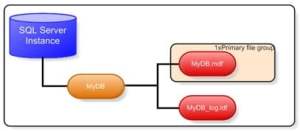
Most of the companies use MS SQL Server for storing and managing information. That makes Microsoft SQL Server one of the most used programs globally. Within each database, you will find two files namely; MDF and LDF. The two happens to be very crucial in ensuring uninterrupted functioning of the database. These two are basically file extensions used in Microsoft SQL. These files get automatically created at the time of database creation. They also share the same storage location.
Role in Backing up and Restoring Database 
The reason why these files are so important is because they happen to be part of backup and recovery process. In simpler words, in case something bad happens to the database, these are the files the administrator will resort to for restoring and recovering the lost/damaged data.

Information Contained in MDF and LDF files 
MDF – It stands for Master Database File. It contains all the main information of the database that are part of the server. This extension also points to various other files. It plays a crucial role in information storage. Overall it is very important for safe and secure supervision of data. In case this file gets damaged, an MDF recovery procedure is conducted to recover it. Doing so is important in order to save the data from going missing.
LDFThis file stores information related to transaction logs for main data file. It basically keeps track of what all changes have been made in the database. The information that this file stores ranges from date/time of change, details of the changes made, as well as information related to whoever made the changes. Information related to computer terminals where changes took place is also stored in the logs. 
LDF stores changes related to inserts, deletion, updates, addition, etc. Transaction logs kept in the server help in identifying activities related to unauthorized changes as well as where an error is originating. Log information can sometimes come handy in fixing errors, recovering important data, and identifying anomalies.

SQL Operations where LDF Files Play an Important Role

Primarily LDF files are important in three major SQL operations:
  1. Recovering incomplete transactions when server is started.
  2. Recovering individual transactions.
  3. Recovering database in times of failures.

Comparison between MDF and LDF Files

  1. MDF file is the primary file in SQL server database. The LDF is a supporting file. The latter stores the information related to transaction logs.
  2. MDF contains database record data. LDF, on the other hand records information related to changes made in the server as well as all the actions performed.
  3. Unlike MDF, LDF is primarily about three major operations that were mentioned earlier.
  4. LDF files can go on to consume a lot of storage space depending on the number of changes made in the server as well as the number of transactions that took place. MDF, on the other hand can vary in its file size with the change of the table and record data.
Ref: 

What are different System Databases available in SQL Server? Explain their uses.

SQL Server mainly contains four System Databases (master,model,msdb,tempdb). Each of them is used by SQL Server for Separate purposes. From all the databases, master database is the most important database.

Master Database

Master Database contains information about SQL server configuration. Without Master database, server can’t be started. This will store the metadata information about all other objects(Databases,Stored Procedure,Tables,Views,etc.) which is Created in the SQL Server .

It will contain login information of users.

If the master database gets corrupted and is not recoverable from the backup, then a user has to again rebuild the master database. Therefore, it is always recommended to maintain a current backup of the master database. As everything crucial to SQL server is stored in the master database, it cannot be deleted as it is the heart of SQL SERVER

Even it is possible to create user objects in master database, it is not recommended to do so. The master database should stay as static as possible. For example, in the case that master database being rebuilt, all user objects will be lost.

Model Database

The model database sets a template for every database that was newly created . It serves as a template for the SQL server in order to create a new database. When we create a new database, the data present in model database are moved to new database to create its default objects which include tables, stored procedures, etc. Primarily, the requirement of model database is not specific to creation of new database only. Whenever the SQL server starts, the Tempdb is created by using model database in the form of a template. By default it does not contain any data.

Msdb

The msdb database is used mainly by the SQL server Management Studio, SQL Server Agent to store system activities like sql server jobs, mail, service broker, maintenance plans, user and system database backup history, Replication information, log shipping .We need to take a backup of this database for the proper function of SQL Server Agent Service.

TempDB

From the name of the database itself, we can identify the purpose of this database. It can be accessed by all the users in the SQL Server Instance.

The tempdb is a temporary location for storing temporary tables(Global and Local) and temporary stored procedure that hold intermediate results during the sorting or query processing and cursors.

If more temporary objects are created and used storage of tempDB then performance of SQL Server will affect.So recommened to move the temdb to the location where sufficient amount of space is there.

This Database will be created by SQL Server instance when the SQL Server service starts. This database is created using model database.We cannot take a backup of temp Database.

Ref:

https://www.vembu.com/blog/system-databases-sql-server/#:~:text=SQL%20Server%20mainly%20contains%20four,is%20the%20most%20important%20database.&text=Master%20Database%20contains%20information%20about%20SQL%20server%20configuration.

https://www.sqlshack.com/sql-server-system-databases-the-master-database/

https://www.mssqltips.com/sqlservertip/1420/sql-server-system-databases/