What are the Physical joins available in Sql Server?

What are the Physical joins available in Sql Server?


Introduction

There are three types of physical join operators in SQL Server, namely Nested Loops Join, Hash Match Join, and Merge Join. In this article, we will be discussing how these physical join operators are working and what are the best practices for these different joins.

As you are aware, there are different types of logical joins, Inner Join, Outer Join (Left, Right, Full) and cross joins that you performed in order to achieve the required results as shown in the below figure.
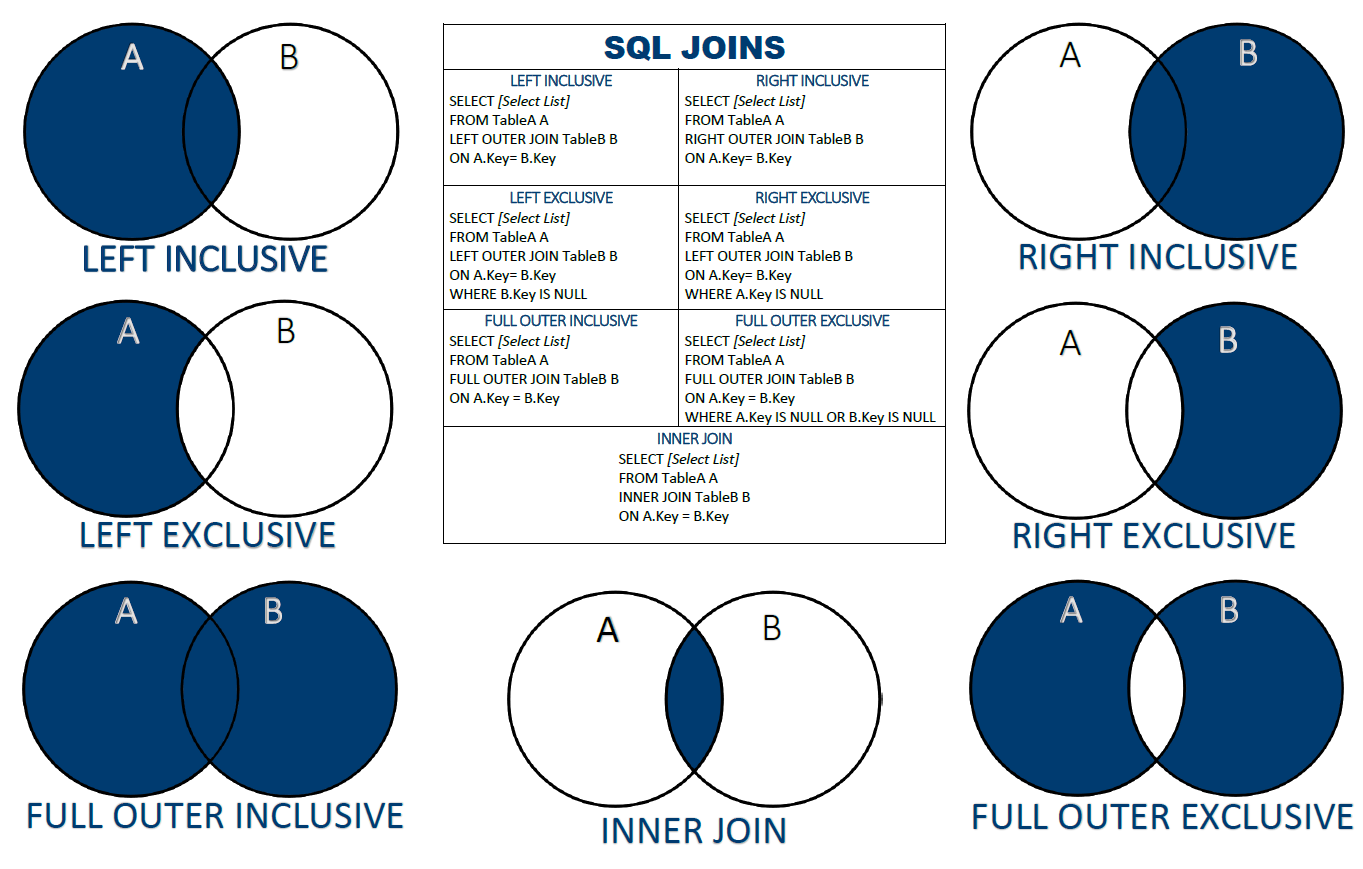
SQL Join Chart - Custom Poster Size : SQL

Source: https://www.reddit.com/r/SQL/comments/aysflk/sql_join_chart_custom_poster_size/

Depending on data volume and the available indexes, different types of physical join operators are used. Therefore, by knowing the details of physical operators, you can improve query performance.

Nested Loops Join

Nested Loops Join has a very simple mechanism. Out of the two tables, the table with a smaller number of records is selected, and it will loop through the second table until matches are found. As you can see this is a not very scalable option for large tables. Hence this is mainly used when there is a table with a smaller number of records and the joining column is indexed in the second table.

Let us create two simple tables with the following scripts.

The above script will create two tables and insert few records. Let us join these two tables with the following query.

You will see the following query plan from the following figure for the above query.
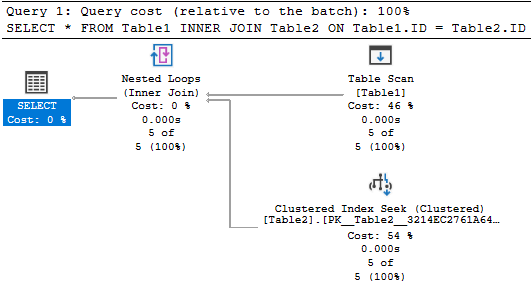
Query execution plan for the Nested Loops Join.

As seen from the above execution plan, the smaller table is selected as the outer table and nested loops join will occur with the inner table.

It is important to remember that you don’t need to join these tables in the same order in your script. Even if you join them differently, the database engine will use the same query plan by identifying the table with smaller records. If you execute the following query, you will get the same execution as above.

There are several other usages of the Nested Loops physical join that are listed below.

Key Lookup

Not only for table joins, but Nested Loops joins are also used for key lookups. Let us run the following query in the sample database, AdventureWorks database on the Product table in which there is a clustered index on the ProductID column and a non-clustered index on the ProductNumber column.

Since there is a non-clustered index on the ProductNumber column, mostly likely that the non-clustered index will be used. Please note that if there are large number of records, there can be a situation where it will perform a clustered index scan instead of the Non-Clustered index seek.

Let us look at the query plan for the above query.
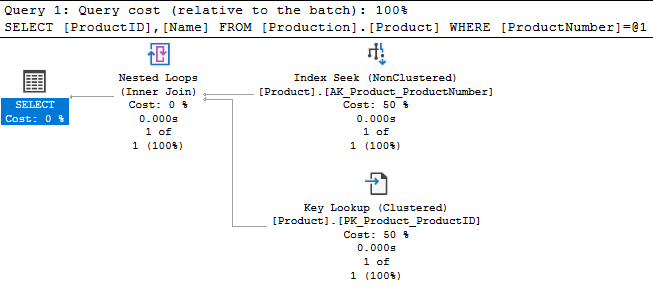
Query Execution plan to retrieve data from clustered index.

Though no join statement is used in the above query, it has used a Nested Loops join in order to combine the Non-clustered index and retrieve the Product Name from the clustered index. If you want to avoid the Nested Loops join, you can create an include index as shown below.

Then the new query plan would look like the following and you will see that nested loops join is removed.
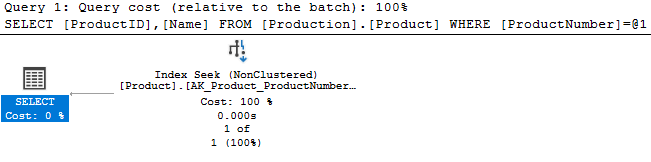
Include indexes to avoid physical join operators.

Since new query requirements can be covered from the non-clustered index, there is no need to fetch data from the clustered index. Therefore, the requirement of Nested Loops joins will not be there.

Cross Join

When cross joins are performed, the only possible way of joining these tables is via Nested Loops Join. Let us execute the following query to observe the different scenarios.

You will see from the following query plan that Nested Loops Join is used ignoring the sizes of the table.
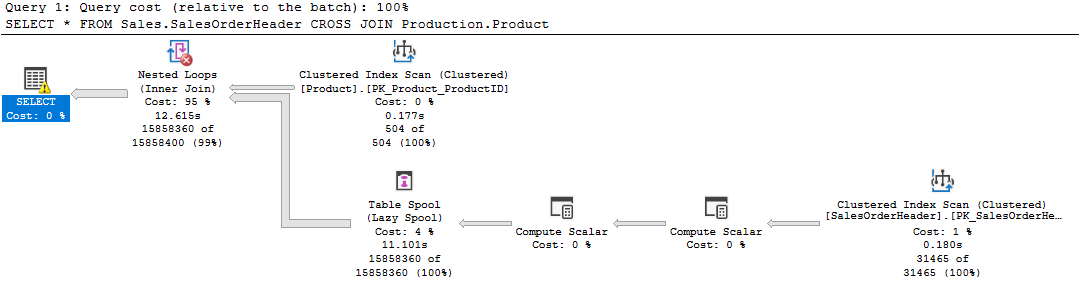
Execution query plan for CROSS Join

Thus, the Cross Join queries are slower and should not be used against large volume tables.

Table Variable

Let’s see what is the behavior of the Joins when the table variable is used to join. To Demonstrate, we will use the following query with a table variable.

You will see the following query plan for the above join query.

Execution plan for Table variable.

This is due to the fact that the database engine is estimating that the Table variable has one record. Since a table with one record is a small table, the above query uses the Nested Loops join.

This can be verified from the query plan as shown in the below figure.
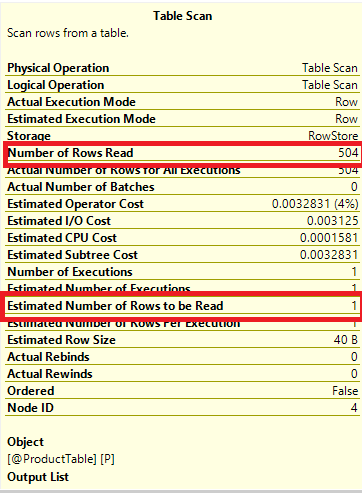
Verifying the Number of reads with table variable.

As you can see, though there are 504 records in the table, the engine has been estimated for only one record.

Merge Join

The Merge join is the most efficient join in SQL Server. In simple terms, if you see a Merge Join, your query plan is an efficient query plan and you do not need to do many changes to improve query performances. Since the Merge Join operator uses sorted data inputs, it can use any two large datasets.

Let us look at the following query.

The following figure shows the query plan for the above query which shows Merge Join.
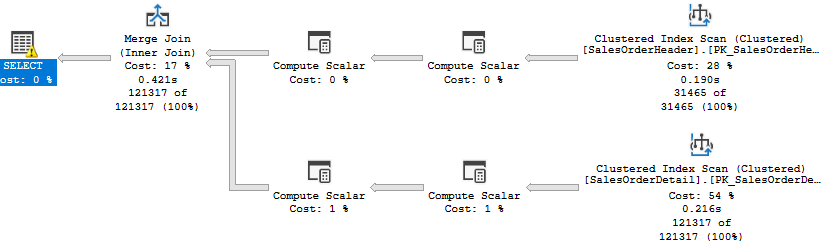
Using Merge Join in the Query Plan.

You need to verify how it receives the sorted input to the Merge Join. If it receives data from the index, then it would be fine. However, if SQL Server does perform any operation to sort the data stream, then you may need to look at the indexes and better try to modify the indexes in order to achieve better results.

Further, if there are duplicates for the joining conditions or many to many relationships between the join conditions, a Work table will be created in the tempdb which may result in performance issues and Tempdb contention. Therefore, if there are duplicates you may try to resolve those data duplication issues before joining the tables if possible.

Hash Match Join

The mechanism for hash match Join is to create a hash table and then match records. Hash table creates in the memory. However, since Hash Match Join will be used for a large dataset, most likely that memory will not be sufficient to hold the data. In that type of situation, Hash Match Join uses tempdb heavily. Further, Hash Match Join is a blocking join that means until the entire join is completed, users will not get the data output. These two properties make Hash Match join a slow operator to join tables in SQL Server. In the case you observe a Hash Match Join in the query plan, you need to look at how to improve the performance. In the case of a data warehouse, hash joins are fine but not for transactional systems. Mainly, you need to look at modifying the indexes or include new indexes. In addition, you may look at the options of rewriting the queries.

One important factor to note here, that Hash Match Join is utilized only for Equi joins.

Summary

In this article, we looked at different physical join operators in SQL Server namely, Nested Loops Join, Merge Join, and Hash Match Join. Nested Loops are used to join smaller tables. Further, nested loop join uses during the cross join and table variables.

Merge Joins are used to join sorted tables. This means that Merge joins are utilized when join columns are indexed in both tables while Hash Match join uses a hash table to join equi joins.

It is important to understand the usages of the different physical join operations. In order to achieve better results, we can look at the options of modifying the indexes or adding new indexes. Further, we can rewrite queries to achieve better results by changing the physical operators.


Ref: 
https://www.sqlshack.com/internals-of-physical-join-operators-nested-loops-join-hash-match-join-merge-join-in-sql-server/#:~:text=There%20are%20three%20types%20of,Match%20Join%2C%20and%20Merge%20Join.

What is the difference between a RID Lookup and a Key Lookup?

 If a Non-Clustered index is built over a Heap table or view (read more about SQL Server indexed views, that have no Clustered indexes) the leaf level nodes of that index hold the index key values and Row ID (RID) pointers to the location of the rows in the heap table. The RID consists of the file identifier, the data page number, and the number of rows on that data page.

On the other hand, if a Non-clustered index is created over a Clustered table, the leaf level nodes of that index contain Non-clustered index key values and clustering keys for the base table, that are the locations of the rows in the Clustered index data pages. 

RID Lookup operation is performed to retrieve the rest of columns that are not available in the index from the heap table based on the ID of each row.

Key Lookup operation is performed to retrieve the rest of columns that are not available in the index from the Clustered index, based on the Clustered key of each row,

What is difference between Table Scan, Index Scan and Index Seek.

What is the difference between a Heap table and a Clustered table? How can we identify if the table is a heap table?

Explain Execution Plan in details?

 An execution plan is a graphical or textual way of showing how the SQL server breaks down a query to get the required result. It helps a user to determine why queries are taking more time to execute and based on the investigation user can update their queries for the maximum result.

Query Analyzer has an option, called “Show Execution Plan” (located on the Query drop-down menu). If this option is turned on, it will display a query execution plan in a separate window when the query is run again.


Q1: What is a SQL Server Execution Plan?

SQL Server Execution Plan is a binary representation of the steps that are followed by the SQL Server Engine to execute the query. It also is known as the most efficient roadmap for the query

For more information, check SQL Server Execution Plans overview

Q2: Which component of the SQL Server Engine is responsible for generating an Execution Plan for the submitted query?

A: The SQL Server Query Optimizer is responsible for creating the most efficient plan to execute the provided query

For more information, check SQL Server Execution Plans overview

Q3: Where will the generated Execution Plan be stored?

A: The SQL Server Execution Plan will be stored in the Plan Cache memory storage

For more information, check SQL Server Execution Plans overview

Q4: What is the goal behind storing the Execution Plan for the query in the Plan Cache?

A: The process of generating the most optimal execution plan is an expensive process. Instead of creating a new Execution Plan each time a new query is submitted, the SQL Server Query Optimizer will search in the plan cache storage for an existing Execution Plan for the submitted query and use it. If there is no plan that can be used for that query, the Query Optimizer will create a new plan, taking more time to execute that query. The Execution plans reuse mechanism is very helpful when there are stored procedures executed frequently

For more information, check SQL Server Execution Plans overview

Q5: What are the main types of Execution Plans that you can generate for a T-SQL query and what is the difference between these two types?

A: The Estimated Execution Plan. It is the plan that is generated by parsing the submitted query as an estimate of how the query will be executed, without being executed

The Actual Execution Plan, that is generated by executing the submitted query, displaying the actual steps that followed while executing the query

For more information, check SQL Server Execution Plans types

Q6: What are the three Execution Plan formats?

A: Graphical FormatText Format and XML Format

Q7: How could the Execution Plan help in identifying the missing index for a specific query?

A: Based on the available SQL Server statistics and the workload performed on the SQL Server, the SQL Server Query Optimizer will provide us with a suggested index, that may improve the performance of the submitted query in a calculated percentage. So, it will display that index as a recommendation with the query plan in green

For more information, check How to Analyze SQL Execution Plan Graphical Components

Q8: What is the correct way of reading the Execution Plan?

A: The correct way to read the SQL Execution Plan is to start from the right side of the plan to the left side and from the top to the bottom, and the most left SELECT operator contains the final result of the submitted query

For more information, check How to Analyze SQL Execution Plan Graphical Components

Q9: How could we use the arrow between the Execution Plan operators to read the plan?

A: You can make use of the arrows that are connecting the operators in identifying the direction and the amount of the data passed between the Execution Plan operators. In addition, the arrow is an indication of how much data passed between the operators

For more information, check How to Analyze SQL Execution Plan Graphical Components

Q10: Can the Estimated SQL Execution Plan result be trusted?

A: This depends on the statistics. If it is updated, the results should be the same. You need the Estimated SQL Execution Plan in case the query will take a long time to execute and you need to troubleshoot it

For more information, check How to Analyze SQL Execution Plan Graphical Components

Q11: What is the difference between the RID and the Key Lookup operators?

A: RID is a row locator that includes information about the location of that record such as the database file, the page, the slot numbers that helps to identify the location of the row quickly

The Key Lookup operator is the Clustered equivalent of the RID Lookup operator

For more information, check SQL Server Execution Plan Operators – Part 2

Q12: What is the Aggregate operator in the Execution Plan?

A: The Aggregate Operator is mainly used to calculate the aggregate expressions in the submitted query, by grouping the values of an aggregated column. The aggregate expressions include the MIN, MAX, COUNT, AVG, SUM operations

For more information, check SQL Server Execution Plan Operators – Part 3

Q13: What is the Compute Scalar operator in the Execution Plan?

A: The Compute Scalar operator is used to perform scalar computation operations in order to calculate a new value from the existing row value

For more information, check SQL Server Execution Plan Operators – Part 3

Q14: What is the Concatenation operator in the Execution Plan?

A: The Concatenation operator takes one or more data sets in sequence as inputs and returns all records from all the input data set. A good example of the concatenation operator is the UNION ALL T-SQL statement

For more information, check SQL Server Execution Plan Operators – Part 3

Q15: What is the ASSERT operator in the Execution Plan?

A: The Assert operator will verify whether the inserted values meet the defined CHECK or FOREIGN KEY constraints on the table called by the query

For more information, check SQL Server Execution Plan Operators – Part 3

Q16: What is the Hash Match operator in the Execution Plan?

A: Hashing table is used when the SQL Server engine divides the joined tables in the query into equally sized buckets, using a Hashing Function, so that it can access these data in a quick manner. In this case, the SQL Server Optimizer will use the Hash Match operator to perform that action

For more information, check SQL Server Execution Plan Operators – Part 3

Q17: What is the Lazy Spool operator in the Execution Plan?

A: The SQL Server Lazy Spool is used to build a temporary table on the TempDB and fill it in a lazy manner. In other words, it fills the table by reading and storing the data only when individual rows are required by the parent operator

For more information, check SQL Server Execution Plan Operators – Part 4

Q18: What is the Parallelism operator in the Execution Plan?

A: The parallel plan is used by the SQL Server Engine to execute the expensive queries faster. The SQL Server Engine decides to use a parallel plan to execute the query when the SQL Server is installed on a multi-processor server, the number of threads that are requested are available to be assigned, the value of the Maximum Degree of Parallelism option is not equal to 1 and the cost of the submitted query is larger than the Cost Threshold for Parallelism value. The Parallelism operator is used by the SQL Server Engine to execute the query using a parallel plan

For more information, check SQL Server Execution Plan Operators – Part 4

Q19: How could we take benefits from the SQL Server Execution Plan in tuning the T-SQL queries performance?

A: The SQL Server Execution Plan can be used in identifying the bad performance parts of the query. The first thing to look at is the most expensive operator with the highest cost, compared with the overall query cost. In addition, having a fat arrow, which is followed by a thin one, is an indication of the missing index that forced scanning a large amount of data to retrieve a small number of records

Next, you need to search for the extra operators, as its overhead will degrade the query performance. Also, the Scan operators that read the overall table or index is an indication of a missing index, the existing index is badly used, or the submitted query has no filtering condition. The Execution Plan Warnings messages are a sign of different query performance problems that should be checked

For more information, check Using the SQL Execution Plan for Query Performance Tuning

Q20: What is the SQL Server level option that can be used to enhance the Plan Cache usage performance and minimize the memory pressure when the majority of your system workload are ad-hoc queries?

A: You can enable the Optimize for Ad hoc Workloads option, to store the SQL Execution Plan of the query in the Plan Cache at the second execution of the query

For more information, check Saving your SQL Execution Plan

Q21: How long will the plan be stored in the Plan cache?

A: It is useless to keep the SQL Server Execution Plan in the Plan cache forever. The SQL Server Engine will automatically drop any plan from the Plan Cache whenever more memory is required by the system or when the plan becomes old and not called for a long time. The SQL Server Engine users the Lazy Writer system process to clean these aged plans

For more information, check Saving your SQL Execution Plan

Q22: How could we explicitly clear the Plan cache?

A: Using the DBCC FREEPROCCACHE T-SQL command

Could you please some items which you may see in an execution plan indicating the query is not optimized. 

  1. Index Scan or Table Scan
  2. Hash Joins
  3. Thick arrows (indicating large work tables)
  4. Parallel streams (Parallelism)
  5. Bookmark lookup (or key lookup)

What are the various tools available for performance tuning?

 Various tools available for performance tuning are:

  • Dynamic Management Views
  • SQL Server Profiler
  • Server Side Traces
  • Windows Performance monitor.
  • Query Plans
  • Tuning advisor

What is a performance monitor?

Answer: Windows performance monitor is a tool to capture metrics for the entire server. We can use this tool for capturing events of the SQL server also.
Some useful counters are – Disks, Memory, Processors, Network, etc.

What is the SQL Profiler?

Answer: SQL Profiler provides a graphical representation of events in an instance of SQL Server for monitoring and investment purpose. We can capture and save the data for further analysis. We can put filters as well to captures the specific data we want.