Difference between CTE and Derived table
Difference b/w CTE and Derived table: CTE Derived Table A CTE can be referenced mult…
Difference between Subquery and Derived table
Difference between subquery and derived table: Subquery Derived Subqueries must be e…
Difference between CTE and Subquery
Difference #1: CTEs can be recursive Difference #2: CTEs are reusable Difference #3:…
Why to Use CTE? Can we Use SubQuery in CTE?
When would you use a CTE? A CTE (Common Table Expression) defines a temporary resul…
What is SubQuery and What are the different types of SubQuery?
A subquery is simply a select statement, that returns a single value and can be nest…

What is Anchor Query/ Anchor Member in sql
Introduction to SQL Server recursive CTE A recursive common table expression (CTE)…
Is it possible to UPDATE a CTE?
Yes & No , depending on the number of base tables, the CTE is created upon, and th…
Difference Between Temporary Table and Table Variable and CTE
Both Temporary Tables (a.k.a # Tables) and Table Variables (a.k.a @ Tables) in S…
Difference between CTE and Derived table
Difference b/w CTE and Derived table:
| CTE | Derived Table |
| A CTE can be referenced multiple times in the same query. So CTE can use in recursive query. | Derived table can’t referenced multiple times. Derived table can’t use in recursive queries. |
| CTE are better structured compare to Derived table. | Derived table’s structure is not good as CTE. |
Difference between Subquery and Derived table
Difference between subquery and derived table:
| Subquery | Derived |
| Subqueries must be enclosed within parentheses. | Derived table must be enclosed within parentheses and table name must be provided. |
| Subquery can have only one column. | Derived table can have one or more column. |
| Subquery mainly use in where clause. | Derived table used in from clause. |
Difference between CTE and Subquery
Difference #1: CTEs can be recursive
Difference #2: CTEs are reusable
Difference #3: CTEs can be more readable
One More Difference: CTEs Must Be Named
Why to Use CTE? Can we Use SubQuery in CTE?
When would you use a CTE?
A CTE (Common Table Expression) defines a temporary result set which you can then use in a SELECT statement. It becomes a convenient way to manage complicated queries. You define Common Table Expressions using the WITH statement. You can define one or more common table expression in this fashion.
Where is CTE stored?
CTE results are not stored anywhere.... they don't produce results.... a CTE is just a definition, just like a VIEW is just a definition. Think of a CTE as being a View that only lasts for the duration of the query.
Can you index a CTE?
A CTE is a temporary, "inline" view - you cannot add an index to such a construct. If you need an index, create a regular view with the SELECT of your CTE, and make it an indexed view (by adding a clustered index to the view).
Is it better to use CTE or subquery?
Advantage of Using CTE
Instead of having to declare the same subquery in every place you need to use it, you can use CTE to define a temporary table once, then refer to it whenever you need it. CTE can be more readable: Another advantage of CTE is CTE are more readable than Subqueries.
Can I use subquery in CTE?
A CTE can reference itself, a subquery cannot. A CTE can reference other CTEs within the same WITH clause (Nest). A subquery cannot reference other subqueries. A CTE can be referenced multiple times from a calling query.
Can we use CTE in view?
A Common Table Expression, also called as CTE in short form, is a temporary named result set that you can reference within a SELECT, INSERT, UPDATE, or DELETE statement. The CTE can also be used in a View.
What is SubQuery and What are the different types of SubQuery?
A subquery is simply a select statement, that returns a single value and can be nested inside a SELECT, UPDATE, INSERT, or DELETE statement.
It is also possible to nest a subquery inside another subquery.
According to MSDN, subqueries can be nested upto 32 levels.
Subqueries are always encolsed in paranthesis and are also called as inner queries, and the query containing the subquery is called as outer query.
The columns from a table that is present only inside a subquery, cannot be used in the SELECT list of the outer query.
1) Non-Corelated Subquery
sub query is executed first and only once. The sub query results are then used by the outer query. A non-corelated subquery can be executed independently of the outer query.
Select [Id], [Name], [Description]
from tblProducts
where Id not in (Select Distinct ProductId from tblProductSales)
2) CoRelated SubQuery
If the subquery depends on the outer query for its values, then that sub query is called as a correlated subquery. In the where clause of the subquery below, "ProductId" column get it's value from tblProducts table that is present in the outer query. So, here the subquery is dependent on the outer query for it's value, hence this subquery is a correlated subquery. Correlated subqueries get executed, once for every row that is selected by the outer query. Corelated subquery, cannot be executed independently of the outer query.
Select [Name],
(Select SUM(QuantitySold) from tblProductSales where ProductId = tblProducts.Id) as TotalQuantity
from tblProducts
order by Name
What is Anchor Query/ Anchor Member in sql
Introduction to SQL Server recursive CTE
A recursive common table expression (CTE) is a CTE that references itself. By doing so, the CTE repeatedly executes, returns subsets of data, until it returns the complete result set.
A recursive CTE is useful in querying hierarchical data such as organization charts where one employee reports to a manager or multi-level bill of materials when a product consists of many components, and each component itself also consists of many other components.
The following shows the syntax of a recursive CTE:
WITH expression_name (column_list)
AS
(
    -- Anchor member
    initial_query
    UNION ALL
    -- Recursive member that references expression_name.
    recursive_query
)
-- references expression name
SELECT *
FROM   expression_name
Code language: SQL (Structured Query Language) (sql)
In general, a recursive CTE has three parts:
- An initial query that returns the base result set of the CTE. The initial query is called an anchor member.
- A recursive query that references the common table expression, therefore, it is called the recursive member. The recursive member is union-ed with the anchor member using the
UNION ALLoperator. - A termination condition specified in the recursive member that terminates the execution of the recursive member.
The execution order of a recursive CTE is as follows:
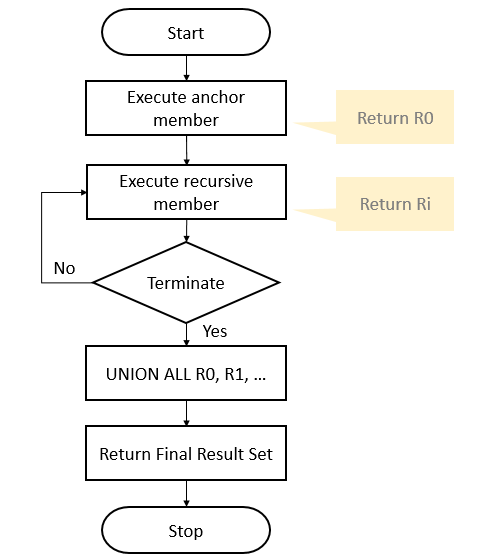
- First, execute the anchor member to form the base result set (R0), use this result for the next iteration.
- Second, execute the recursive member with the input result set from the previous iteration (Ri-1) and return a sub-result set (Ri) until the termination condition is met.
- Third, combine all result sets R0, R1, … Rn using
UNION ALLoperator to produce the final result set.
The following flowchart illustrates the execution of a recursive CTE:
SQL Server Recursive CTE examples
Let’s take some examples of using recursive CTEs
A) Simple SQL Server recursive CTE example
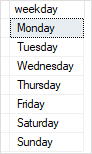
This example uses a recursive CTE to returns weekdays from Monday to Saturday:
WITH cte_numbers(n, weekday)
AS (
    SELECT
        0,
        DATENAME(DW, 0)
    UNION ALL
    SELECT
        n + 1,
        DATENAME(DW, n + 1)
    FROM
        cte_numbers
    WHERE n < 6
)
SELECT
    weekday
FROM
    cte_numbers;
Code language: SQL (Structured Query Language) (sql)
Here is the result set:
In this example:
The DATENAME() function returns the name of the weekday based on a weekday number.
The anchor member returns the Monday
SELECT
    0,
    DATENAME(DW, 0)
Code language: SQL (Structured Query Language) (sql)
The recursive member returns the next day starting from the Tuesday till Sunday.
    SELECT
        n + 1,
        DATENAME(DW, n + 1)
    FROM
        cte_numbers
    WHERE n < 6
Code language: SQL (Structured Query Language) (sql)
The condition in the WHERE clause is the termination condition that stops the execution of the recursive member when n is 6
Code language: SQL (Structured Query Language) (sql)n < 6
B) Using a SQL Server recursive CTE to query hierarchical data
See the following sales.staffs table from the sample database:
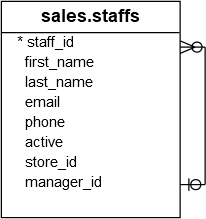
In this table, a staff reports to zero or one manager. A manager may have zero or more staffs. The top manager has no manager. The relationship is specified in the values of the manager_id column. If a staff does not report to any staff (in case of the top manager), the value in the manager_id is NULL.
This example uses a recursive CTE to get all subordinates of the top manager who does not have a manager (or the value in the manager_id column is NULL):
WITH cte_org AS (
    SELECT
        staff_id,
        first_name,
        manager_id

    FROM
        sales.staffs
    WHERE manager_id IS NULL
    UNION ALL
    SELECT
        e.staff_id,
        e.first_name,
        e.manager_id
    FROM
        sales.staffs e
        INNER JOIN cte_org o
            ON o.staff_id = e.manager_id
)
SELECT * FROM cte_org;
Code language: SQL (Structured Query Language) (sql)
Here is the output:
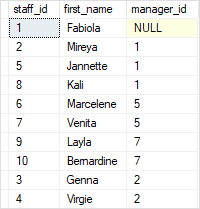
In this example, the anchor member gets the top manager and the recursive query returns subordinates of the top managers and subordinates of the top manager, and so on.
In this tutorial, you have learned how to use the SQL Server recursive CTE to query hierarchical data.
Is it possible to UPDATE a CTE?
Yes & No, depending on the number of base tables, the CTE is created upon, and the number of base tables affected by the UPDATE statement.
1. A CTE is based on a single base table, then the UPDATE suceeds and works as expected.
2. A CTE is based on more than one base table, and if the UPDATE affects multiple base tables, the update is not allowed and the statement terminates with an error.
3. A CTE is based on more than one base table, and if the UPDATE affects only one base table, the UPDATE succeeds(but not as expected always)
Difference Between Temporary Table and Table Variable and CTE
| 1. SYNTAX | |||
Below is the sample example of Creating a Temporary Table, Inserting records into it, retrieving the rows from it and then finally dropping the created Temporary Table.
|
Below is the sample example of Declaring a Table Variable, Inserting records into it and retrieving the rows from it.
RESULT:
| ||
| 2. MODIFYING STRUCTURE | |||
Temporary Table structure can be changed after it’s creation it implies we can use DDL statements ALTER, CREATE, DROP.
Below script creates a Temporary Table #Customer, adds Address column to it and finally the Temporary Table is dropped.
| Table Variables doesn’t support DDL statements like ALTER, CREATE, DROP etc, implies we can’t modify the structure of Table variable nor we can drop it explicitly. | ||
| 3. STORAGE LOCATION | |||
| One of the most common MYTH about Temporary Table & Table Variable is that: Temporary Tables are created in TempDB and Table Variables are created In-Memory. Fact is that both are created in TempDB, below Demos prove this reality. | |||
| 4. TRANSACTIONS | |||
| Temporary Tables honor the explicit transactions defined by the user. | Table variables doesn’t participate in the explicit transactions defined by the user. | ||
| 5. USER DEFINED FUNCTION | |||
| Temporary Tables are not allowed in User Defined Functions. | Table Variables can be used in User Defined Functions. | ||
| 6. INDEXES | |||
| Temporary table supports adding Indexes explicitly after Temporary Table creation and it can also have the implicit Indexes which are the result of Primary and Unique Key constraint. | Table Variables doesn’t allow the explicit addition of Indexes after it’s declaration, the only means is the implicit indexes which are created as a result of the Primary Key or Unique Key constraint defined during Table Variable declaration. | ||
| 7. SCOPE | |||
| There are two types of Temporary Tables, one Local Temporary Tables whose name starts with single # sign and other one is Global Temporary Tables whose name starts with two # signs.Scope of the Local Temporary Table is the session in which it is created and they are dropped automatically once the session ends and we can also drop them explicitly. If a Temporary Table is created within a batch, then it can be accessed within the next batch of the same session. Whereas if a Local Temporary Table is created within a stored procedure then it can be accessed in it’s child stored procedures, but it can’t be accessed outside the stored procedure.Scope of Global Temporary Table is not only to the session which created, but they will visible to all other sessions. They can be dropped explicitly or they will get dropped automatically when the session which created it terminates and none of the other sessions are using it. | Scope of the Table variable is the Batch or Stored Procedure in which it is declared. And they can’t be dropped explicitly, they are dropped automatically when batch execution completes or the Stored Procedure execution completes. | ||
- Comparative Analysis of Temporary Table and Table Variable based on the aspects like Syntax, Storage Location and Transactions.
- Comparative Analysis of Temporary Table and Table Variable based on the aspects like User Defined Functions, Indexes and Scope.
Ref: https://sqlhints.com/tag/temporary-table-vs-table-variable/
- Are unindexable (but can use existing indexes on referenced objects)
- Cannot have constraints
- Are essentially disposable
VIEWs - Persist only until the next query is run
- Can be recursive
- Do not have dedicated stats (rely on stats on the underlying objects)
- Are real materialized tables that exist in tempdb
- Can be indexed
- Can have constraints
- Persist for the life of the current CONNECTION
- Can be referenced by other queries or subprocedures
- Have dedicated stats generated by the engine
Temp Table Vs Table Variable Vs CTE
| Sl.# | Temp Table | Table Variable | CTE |
| 1 | Scope wise the local temp table is available only in the current session.
The global temp tables are available for all the sessions or the SQL Server connections.
| The scope of the table variable is just within the batch or a view or a stored procedure. | The scope of the CTE is limited to the statement which follows it. |
| 2 | Temp tables are stored in TempDB. | Table variables are also stored in TempDB. | The result set from CTE is not stored anywhere as that are like disposable views. |
| 3 | The name of the temp table can have only up to 116 characters. | The name of the table variable can have up to 128 characters. | Not Applicable |
| 4 | Considering the performance, it is recommenced to use temp table for storing huge data, say more than 100 rows. | Table variable is recommended for storing below 100 rows. | No such performance consideration. CTE normally used as a replacement for complex sub queries. |
| 5 | The structure of temp table can be altered after creating it. | The structure of table variable cannot be altered. | The definition of CTE cannot be changed during run time. |
| 6 | Can explicitly drop temp tables using DROP statement. | Cannot drop table variable explicitly. | Cannot be dropped. |
| 7 | Cannot be used in User Defined Function (UDF). | Can be used in UDF. | Can be used in UDF. |
| 8 | Temp tables take part in transactions. | Table variables wont take part in transactions. | Not Applicable |
| 9 | Index can be created on temp tables. | Index is not possible on table variables. | CTE cannot be indexed. |
| 10 | Can apply read lock on temp tables. | Locking is not possible in table variables. | Locking is not possible in CTE as well. |
| 11 | Constraints can be created on temp tables except FOREIGN KEY. | PRIMARY KEY, UNIQUE KEY and NULL are the only constraints allowed in table variable. | CTE cannot have constraints. |
Difference b/w Temp table and Temp variable:
| Temp Table | TempVariable |
| Scope of Temp Table is wider the temp variables of. Local temporary tables are temporary tables that are available only to the session that created them and Global temporary tables are temporary tables that are available to all sessions and all users. | Scope of the Temp variables are limited up to current batch and current stored procedure. |
| Temp tables can be create using Create Table and Select Into commands | Temp variables only through Declare command can’t be created using select into command. |
| Temp tables can be drop through Drop Command. | We can not drop a Temp variables but we can use truncate command for temp variables. |
| Name of Temp table can have maximum 116 characters. | Name of a temp variables can have MAXIMUM 128 characters. |
| Temp table support foreign key concept. | Temp variable doesn’t support foreign key. |
| Temp tables support transaction management. | Temp variables doesn’t support transaction management. Rollback not work for temp variables. |
| Temp tables can easily handle large amount of data. | Temp variables are suitable with small amount of data. |
Ref: https://www.mytecbits.com/microsoft/sql-server/temp-table-vs-table-variable-vs-cte